
6 min readOfficeDocs Team

A Zero-Knowledge Editor Is Not a Document Suite

A zero-knowledge editor keeps the server from reading the file. A suite you administer can audit, retain and restore it. Those requirements contradict.

A self-hosting roundup published in February 2026 sorts the category into two piles: an Office engine for .docx fidelity, and a zero-knowledge editor whose server never sees the document. That page names CryptPad for the second pile, and it says the server cannot search what it cannot read. Those sentences describe a real product class. They do not describe a document suite an organisation administers.

The two requirements contradict each other. If the server cannot read the file, the organisation that runs the server cannot audit it, cannot put a retention hold on the text, and cannot restore a readable copy without keys it does not hold. If the organisation must do those things, the operator can read the file. Encryption at rest does not split the difference. Key custody is the longer version of that sentence: a running system holds the keys it needs to serve the document.

Confirm CryptPad, or whichever pad you are actually evaluating, with its vendor. This page will not freeze a design on a third-party roundup. The dates and the product names on that page can move. The contradiction does not.
Name the adversary before you name the product

Three different fears get written down as “we need it private”.

The operator is the adversary. A journalist, a small group, or anyone who does not trust the person with the server login. The correct product is one where that login cannot yield the text. A suite fails this test on purpose: the administrator can open the document, because that is how permission reviews, legal hold and restore work.

A vendor employee, or a region you do not control, is the adversary. The files should sit on infrastructure your organisation operates, and inference should not leave that boundary. A suite in your own deployment answers this. A zero-knowledge pad also answers a narrower slice of it, and then takes away the audit. On-premises document collaboration is the deployment question. It is not a claim that the operator is blind.

A reviewer is going to ask who opened a named document. That question assumes someone can read the log and the file. Security and data control is the list. A pad whose operator cannot see the content will fail it, and the failure is the feature.

Decide the trust model before the product 01 Name the adversary Operator, a vendor, or a region you do not control. 02 Ask who must read it Audit needs a reader. Zero-knowledge forbids one. 03 Restore one real file A blob is not a document until someone can open it. 04 Only then pick A suite fails the first row. A pad fails the second.
Figure 1. Teams that start at the product name answer the wrong row and then call the pilot a failure.

What the server-blind editor is actually for

Use it when the threat model is the operator, and the work fits a browser pad.

The roundup describes CryptPad as end-to-end encrypted in the browser, with the server storing ciphertext. It lists documents, spreadsheets, presentations, and also a kanban, a whiteboard, polls and a code pad. It says Office-format fidelity is limited unless a separate OnlyOffice integration is added, that there is no desktop app, and that sharing is a CryptPad link rather than a file the rest of the network can open. It also says server-side search does not exist, because the server never sees the text. Treat every one of those as a claim to re-check on the vendor site. Do not copy the Docker tag or the memory numbers off a roundup into a capacity plan.

That shape has a cost even when the cryptography is real. There is no directory group to revoke when someone leaves, unless the product grew one and you have verified it. There is no server-side report of who read a contract. A backup restores ciphertext. Content comes back only for whoever still holds the keys. If those keys were in a browser profile that was wiped, the backup is a polite way to lose the file.

What the suite is for, and the picture of it

A suite keeps the document as an object the organisation can administer: permissions, comments, versions, a guest, a leaver, an export. The server renders that object. That is the opposite of a pad.

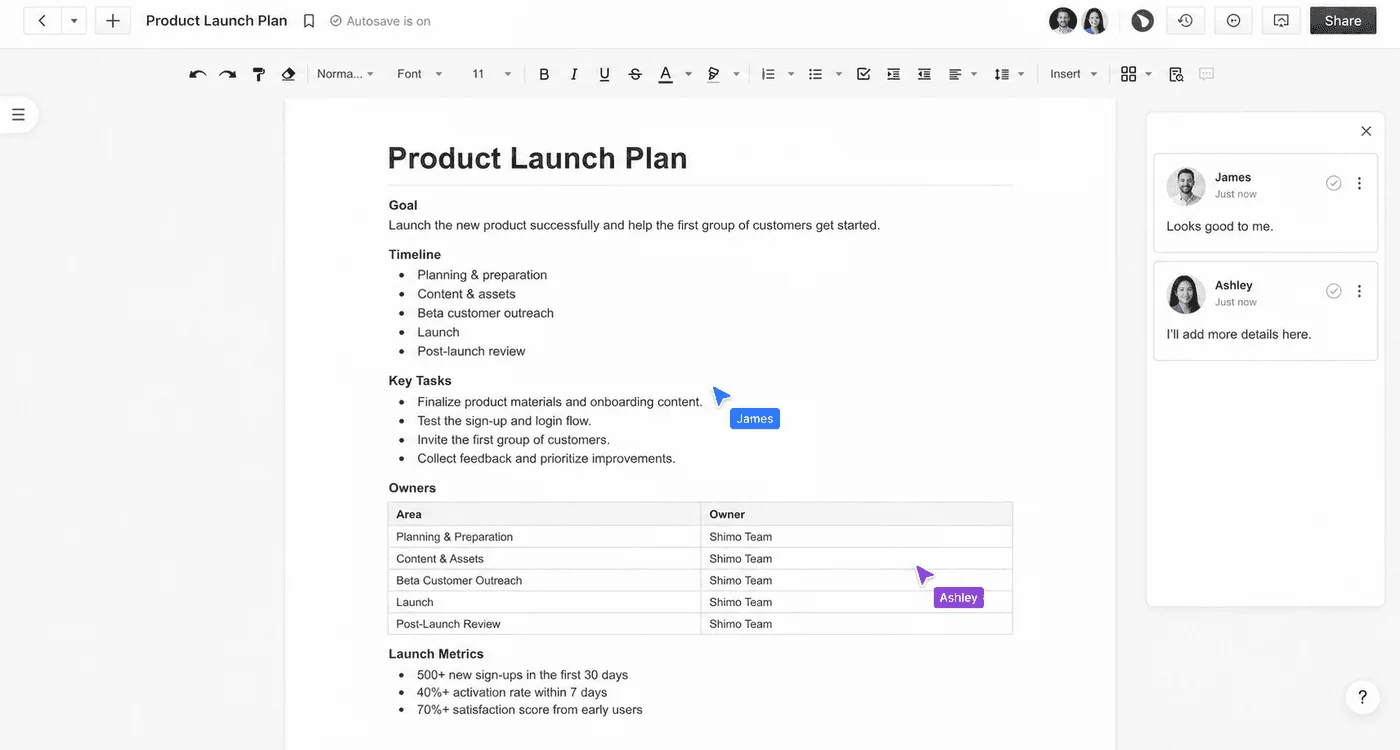
A document titled Product Launch Plan open in an editor, with a formatting toolbar, autosave, a Share button, James and Ashley comment cards, and named cursors on a task list and an owners table.
Figure 2. Named cursors and comments exist because the server can see the document. If the operator must not see this page, this product is the wrong one.

The same property is why a security review can be answered in document language. One file, one guest, one leaver, one export, one administrator who should not have access. Answering a security review walks that sequence. None of it works if the operator is cryptographically unable to open the file.

It is also why encryption marketing does not transfer. Disk encryption and TLS are assumed. They do not make the operator blind. Customer-managed keys change who can destroy the ability to read, not whether a running node can read. If a vendor says “encrypted” and your requirement was “the hoster cannot read it”, ask which of those two sentences they meant. They are not synonyms.

OfficeDocs is the second product. It is a suite for real-time docs, sheets and slides, run in a boundary you operate, with an administrator who can open what the access rules allow. It is not a zero-knowledge pad. Buying it to keep your own administrators from reading the documents will not work, and the pilot will be graded against a property the product refuses.

Where each one is the wrong replacement

Requirement Shorter path Why
The person with the server login must not be able to read the text A zero-knowledge editor, confirmed with its vendor A suite fails this by design
Office round-trip, especially spreadsheets that must compute the same number An Office engine, tested on your files A pad roundup will tell you fidelity is the other product. ONLYOFFICE is that comparison
Audit, retention, guests, a leaver, restore of a readable file A suite you administer The operator has to be able to read
Content cannot sit in Microsoft 365, and the library is SharePoint Server Not this decision Support ended. Online, Subscription Edition and a suite are three different moves. That page separates them
Both “operator cannot read” and “produce the text for counsel” Stop No single copy satisfies both. Split the corpus, or drop one requirement

The last row is the one procurement writes most often. Split the corpus if you truly have both populations: a pad for the material whose threat is the operator, a suite for the material a reviewer will ask to see. Write down which system is authoritative. Two copies with no rule is how teams lose the file they meant to protect.

Frequently asked questions

When is a zero-knowledge editor the right product?

When the adversary is the person who runs the server, and the document must stay unreadable there. Search, audit and a restore of the text then belong to someone else, because the operator cannot see the file. Confirm the current product with its vendor before you treat a roundup as a specification.

Does encryption at rest stop the operator reading a document?

No. A running suite holds the keys it needs to open the file for the people allowed to edit it. Encryption at rest stops a stolen disk. It does not stop the operator, a lawful request to that operator, or an administrator with production access.

Can a document suite be both auditable and unreadable to its operator?

Not the same copy. An audit that quotes the document needs a party who can read it. A zero-knowledge design exists so the operator is not that party. Pick which failure you can accept, then pick the product. Do not write both requirements into one line of a security questionnaire.

← All articles